Fintech · Mobile onboarding · Visual IVR
Demat onboarding, with a voice beside you
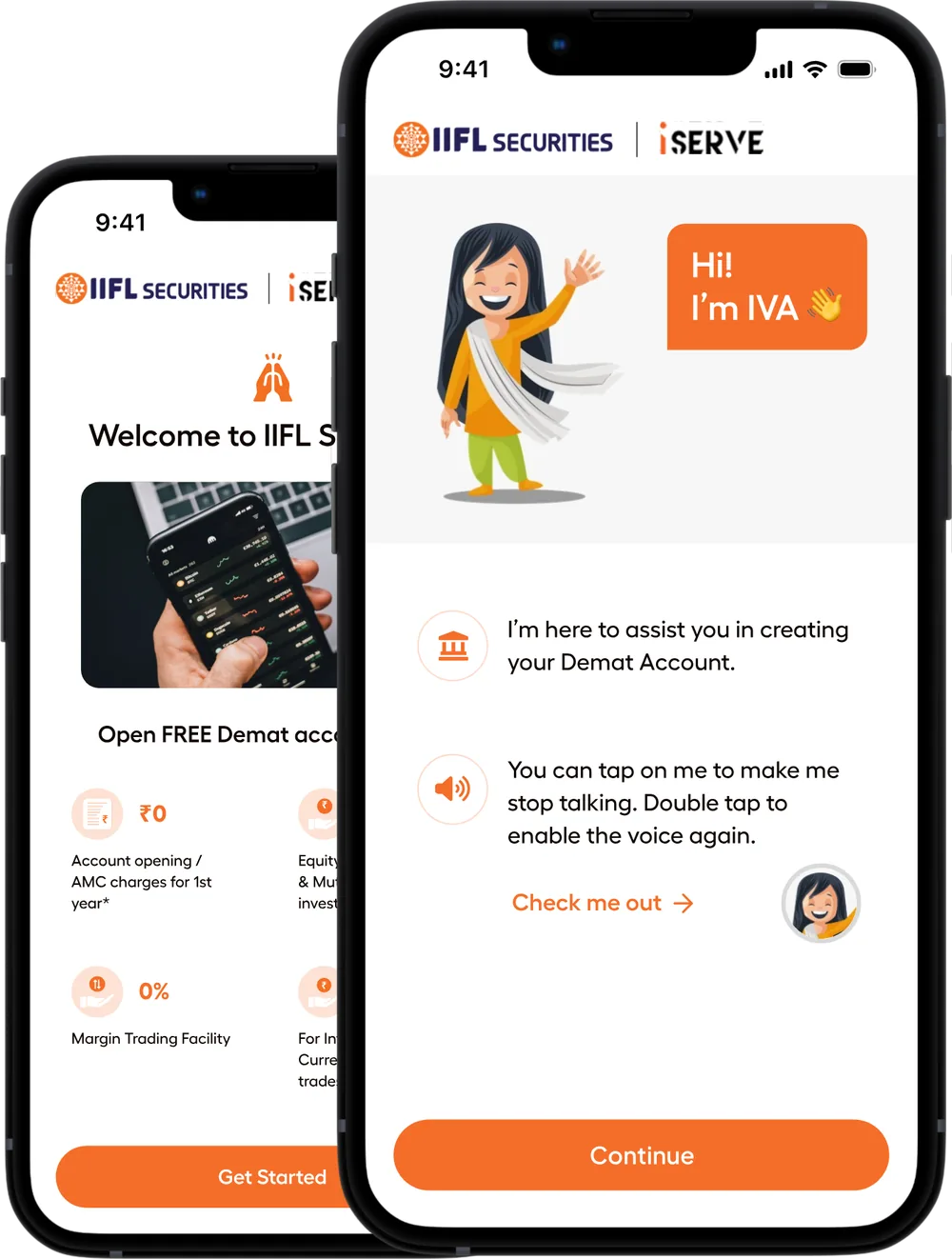
A mobile Demat and trading account flow for IIFL Securities, guided by IVA: Ubona’s visual IVR assistant that explains every step by voice and on screen.
Support
Flow
Screens
- My role
- UX designer (intern)
- Team
- Me + a senior UX designer
- Timeline
- 3 weeks · 2021–22
- Client
- Ubona for IIFL Securities
At a glance
The project in one minute
The problem
Long forms, no one to ask
Opening a Demat account meant PAN, bank, FATCA, signature and cheque steps with no help in the moment. Stuck users called customer care.
The solution
A guide that talks and shows
IVA, a visual IVR assistant, speaks each instruction while the screen shows the same step, from the first OTP to the final submit.
My part
Flow, wireframes and final UI
I mapped the 11-step task flow, drew the wireframes and designed the final screens, reviewed by a senior UX designer and the Ubona team.
01 · Context
What is Ubona?
Ubona, an Indian voice-technology company, was moving into banking and broking. IIFL Securities was its first client, and Ubona asked us to design the mobile onboarding.

Core technology
- Speech recognition
- Turns what people say into text and intent.
- Natural language processing
- Understands everyday language, not commands.
- Voice-based IVR
- Interactive Voice Response that guides callers.
Products
- Cloud telephonyVoice, video and virtual numbers
- Conversational AI botAutomated, natural-language chat
- IP telephonyCalls fully over the internet
- Call recordingEvery call captured and stored
- Contact centreTools for support teams
- Automated visual IVRVoice plus a screen, on the phoneUsed for IIFL
The brief
01 · Their goal
Grow into financial services
Diversify the business by offering IVR services to banks and brokerage firms.
02 · First client
IIFL Securities
A brokerage firm that wanted an IVR-based mobile experience for its customers.
03 · What they asked us
Design the onboarding
A smooth mobile Demat and trading account flow that works with Ubona’s voice technology.
02 · Domain
How a Demat account comes to life
Before designing anything, I had to understand the product, the steps and the people behind it. Three things shaped every screen.
Two accounts, one investor
Investing in India needs two linked accounts: one to trade, one to hold what you own.
- Your bankBank accountMoney comes from here
- Account 1Trading accountPlaces buy and sell orders
- MarketStock exchangeMatches buyers and sellers
- Account 2Demat accountHolds your shares electronically
Selling runs the other way: shares leave the Demat account and the money goes back through the trading account to your bank.
Five steps to open one
Each step is required by regulation. None could be removed, so the job was to make every one easier.
- IIFLChoose a Depository Participant
The intermediary that opens the account. Here, IIFL.
- Fill the form and add documents
PAN, bank, investment and FATCA details.
- Complete KYC
Identity and address checks, including a selfie.
- Sign the agreement
On screen, or by uploading a signature.
- Receive the account number
After IIFL verifies the application.
Six parties, many rules
Every account passes through six parties. Most of them add a rule the flow has to follow.
The customer
Investor
Puts money into assets to earn returns and grow wealth.
Where the account lives
Depository Participant
Opens and manages Demat accounts. In this project, IIFL.
Depository NSDL / CDSL
Holds securities electronically. Every DP connects to one.
Who sets and checks the rules
SEBI
Protects investors. Its rules make KYC and FATCA mandatory.
KYC agencies
Verify identity and address to prevent fraud.
Where the money comes from
Banks
Fund the trading account. The link is checked with a ₹1 deposit and a cancelled cheque.
03 · Problem
Why are we doing this?
Online onboarding already existed. The trouble was inside it: people got confused, made mistakes, and picked up the phone.
Filling out the application without any support was confusing and frustrating.
I often felt lost because there was no one to help me through the steps.
Opening a Demat account feels like it takes forever because of all the paperwork.
Illustrative quotes, based on common complaints.
1L+Demat accounts opened a day
Industry-wide, at the timeAt that scale, even small friction reached a lot of people. We found two problems with the flow:
- It is long and form-heavy: PAN, bank, FATCA, signature and cheque, one after another. Easy to get wrong.
- There is no real-time help. Stuck users call support, give up, or leave the application half done.
The challenge
How might we guide first-time users through Demat account opening with voice plus visual guidance, so they feel supported, finish the flow, and don’t drop off or call support?
04 · Approach
How did we approach it?
01
Desk research
Learned what Demat and trading accounts are, how one is opened, and who is involved.
02
Input from Ubona
Worked with the Ubona team on what their visual IVR could do and had to support.
03
Review and refine
Reviewed along the way and refined with feedback from Ubona and our design team.
05 · Solution
How are we solving this problem?
The solution
With visual IVR: a voice that talks users through each step, and a screen that shows the same step at the same time.
How does visual IVR work?
Users arrive by calling customer care, so they are people who already got stuck or prefer to talk.
- 1User calls customer care
The agent sends an SMS link to continue with visual IVR.
- 2User starts account creation
- 3IVA welcomes the user
Audio and on-screen instructions for every step.
- 4User completes KYC with guidance
- 5User submits the application
IIFL then verifies it for approval.
06 · Structure
From task flow to wireframes
I mapped the whole journey first, then sketched one screen for each step.
Task flow: creating a Demat account
- Start
- Preview IVALearn how to talk to it
- Verify mobile number
- Enter PAN details
- Enter account detailsName, bank, IFSC
- Investment preferencesEquity, derivatives, funds
- Enter FATCA details
- Personal detailsGender, marital status, selfie
- Sign or upload signature
- Upload cancelled cheque
- Submit for verification
Wireframes
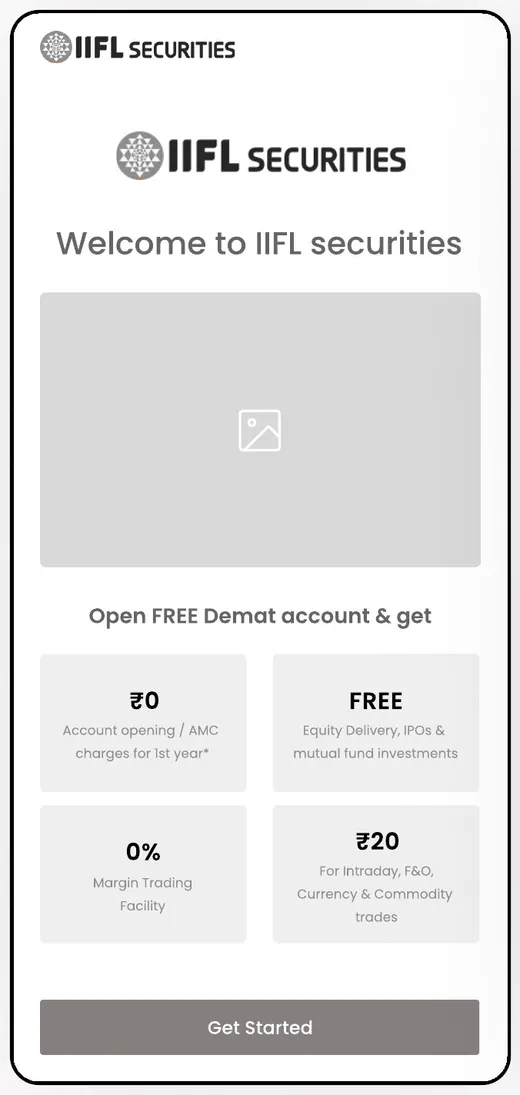
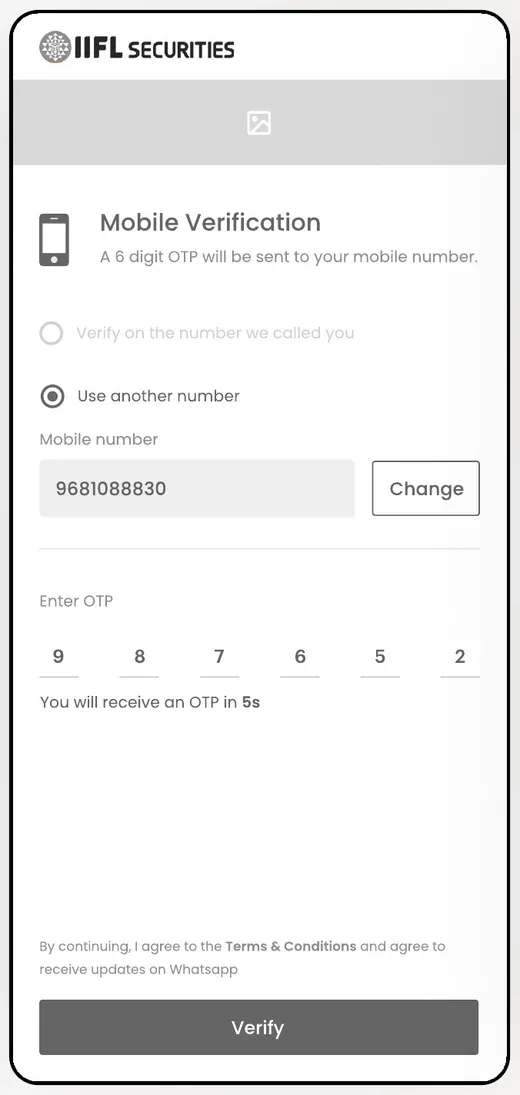
Ten low-fidelity screens, one for each step, to agree the flow with Ubona before visual design.
07 · Design
Final screens, with IVA beside every step
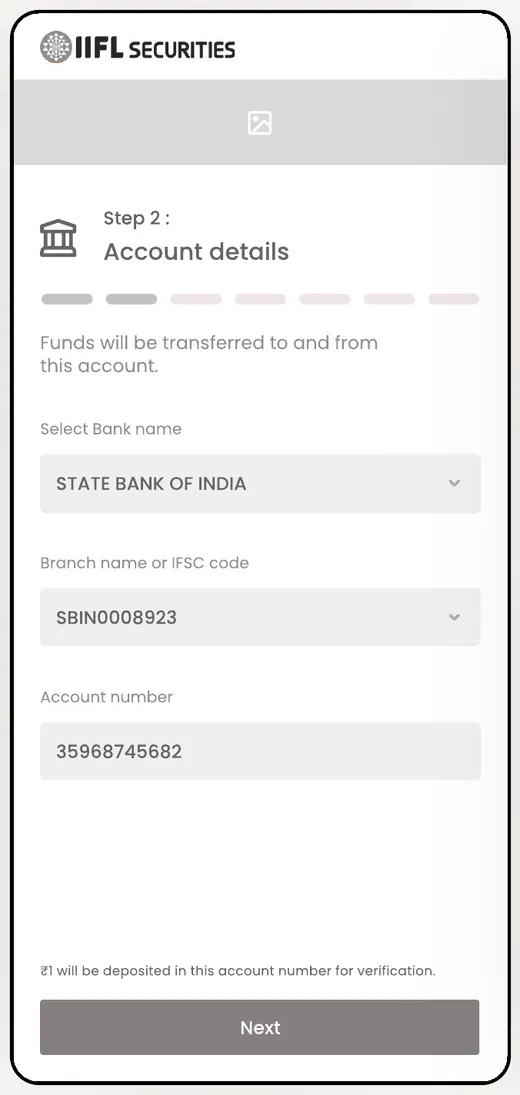
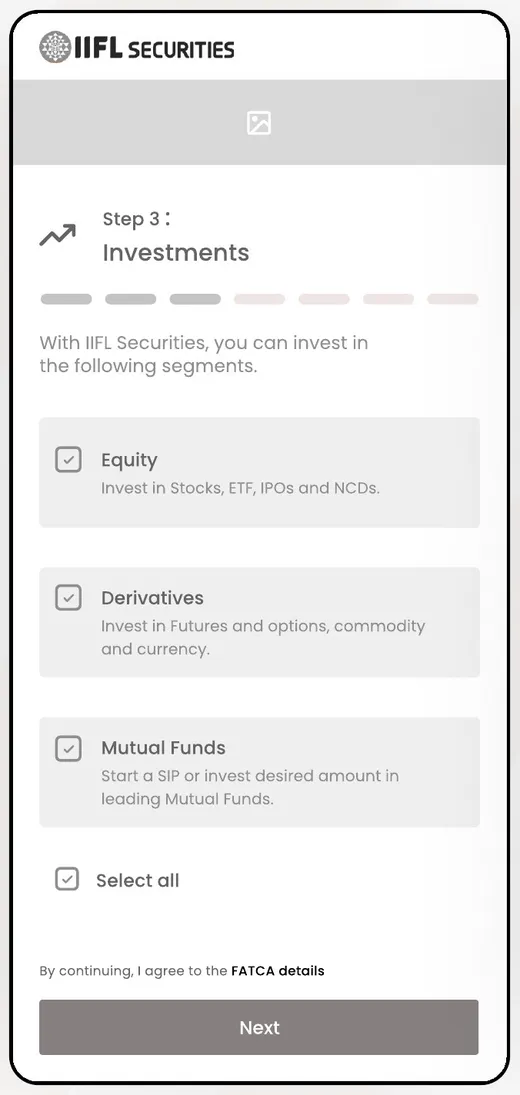
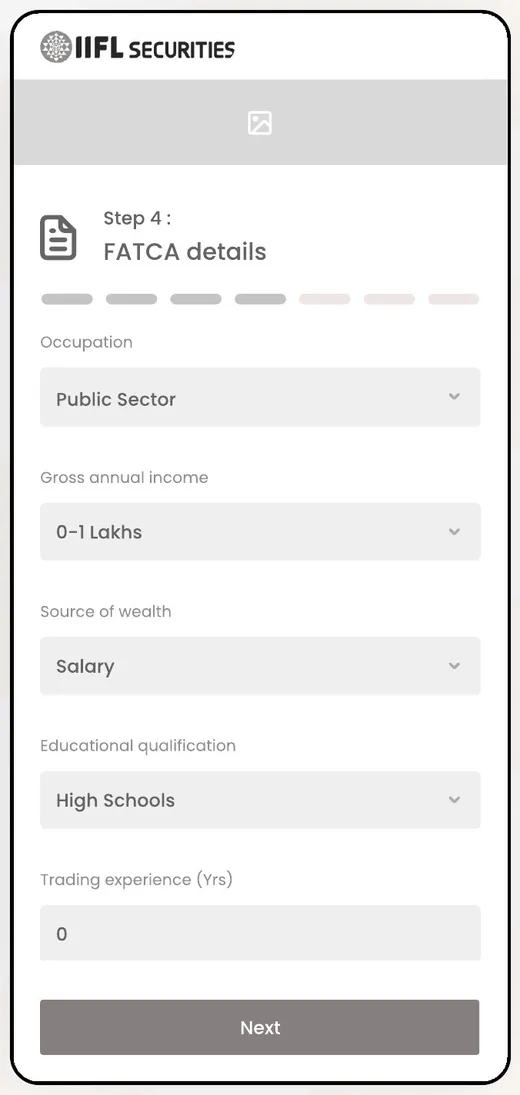
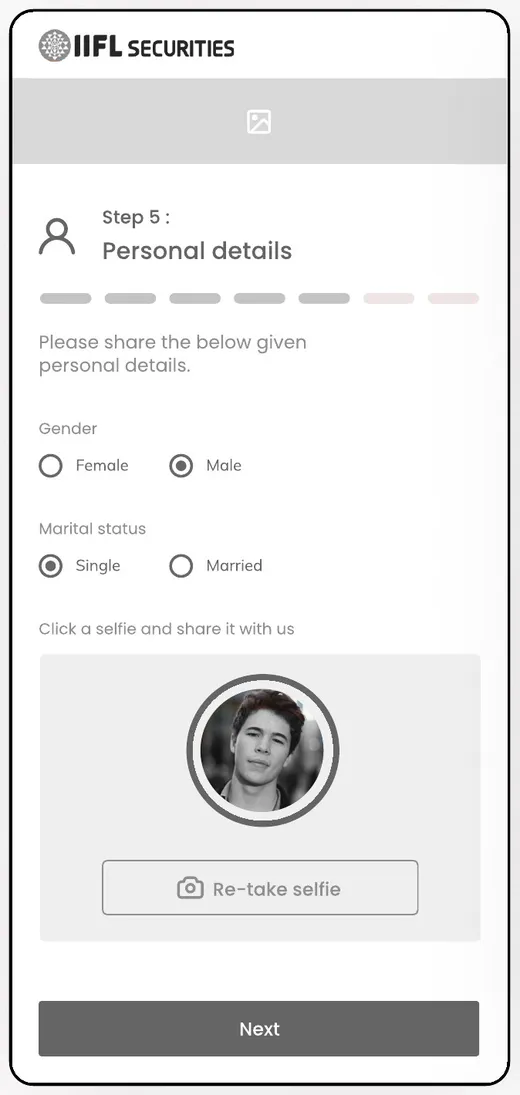
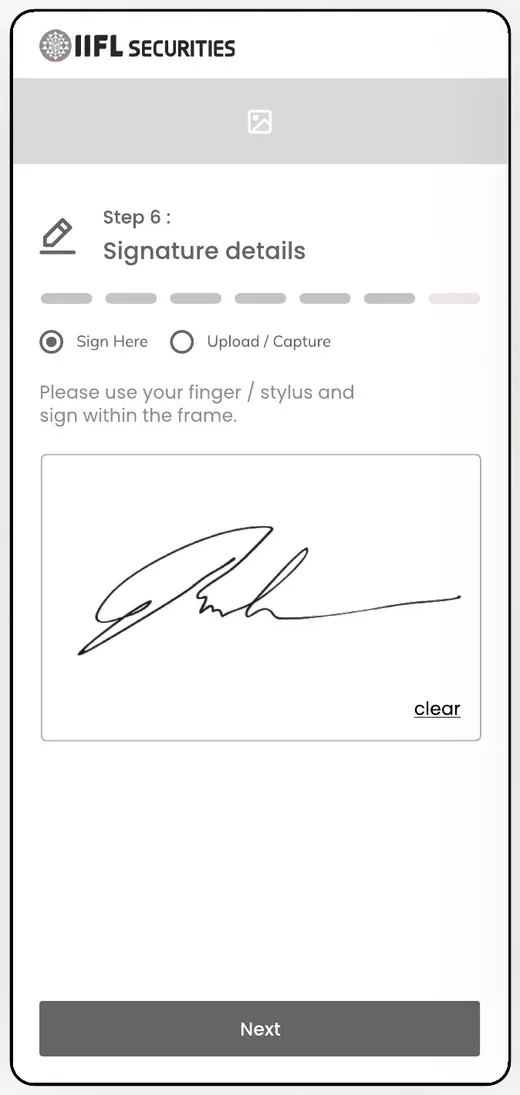
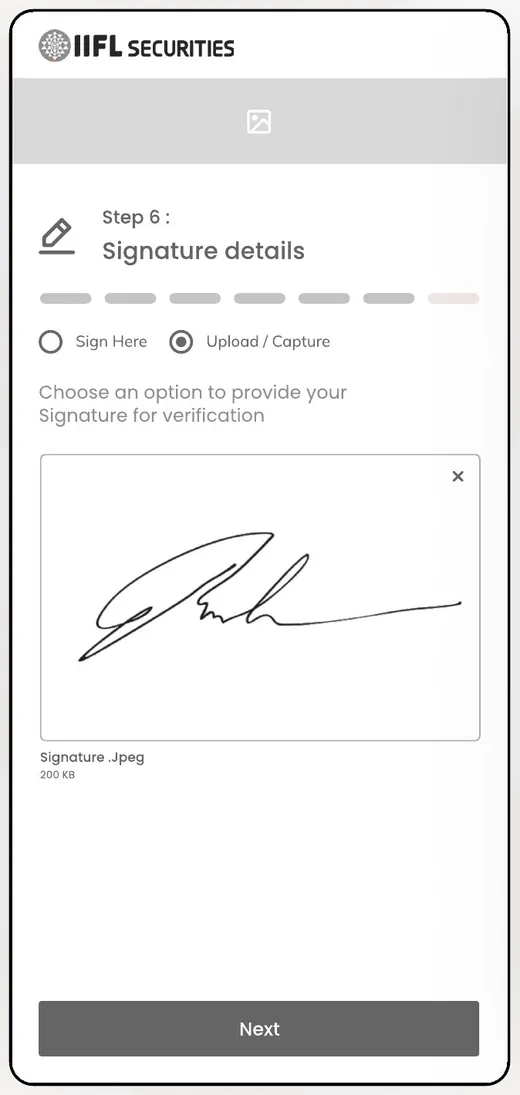
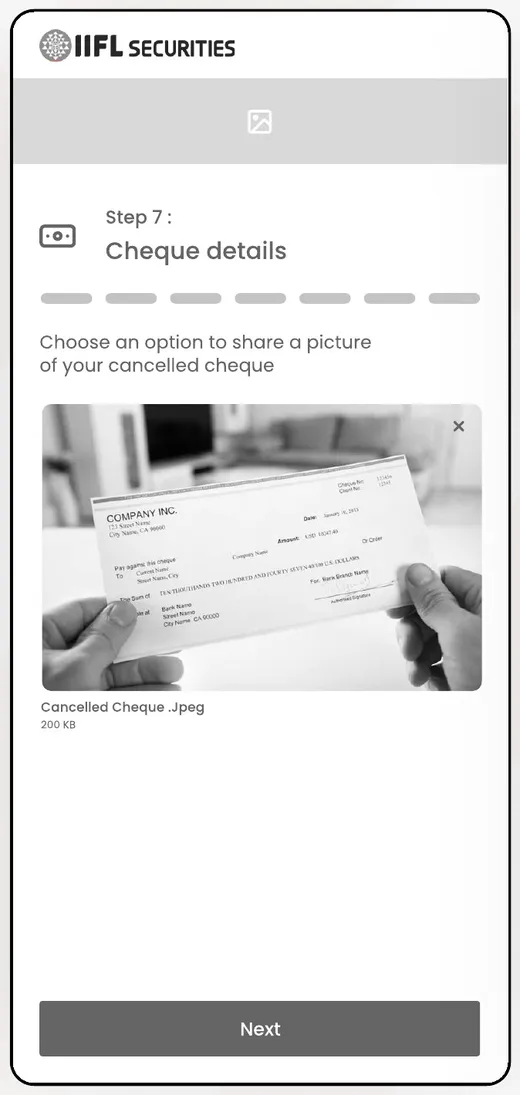
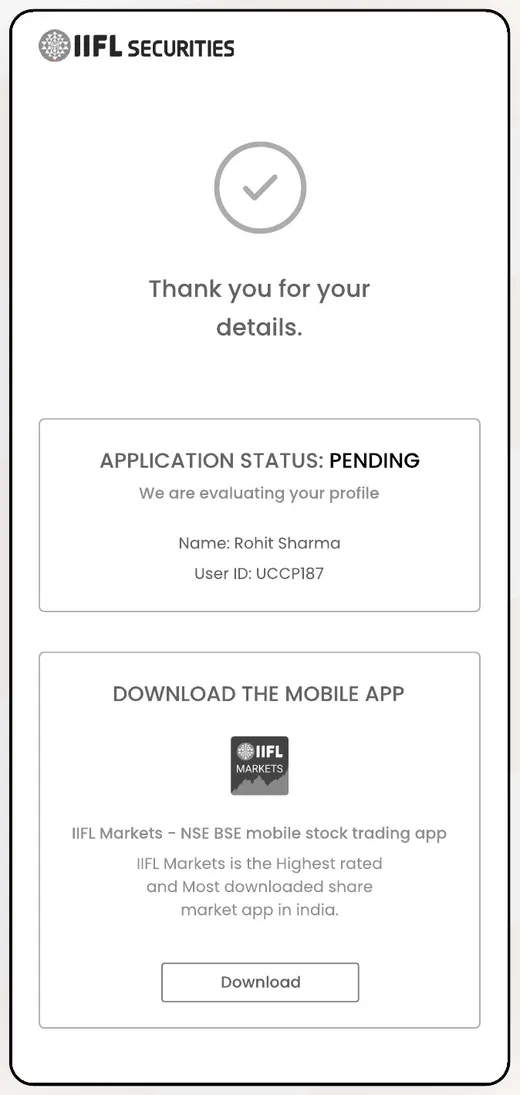
Seven screens, from meeting IVA to submitting the application. Each note points to the part of the screen it explains.
Design approach
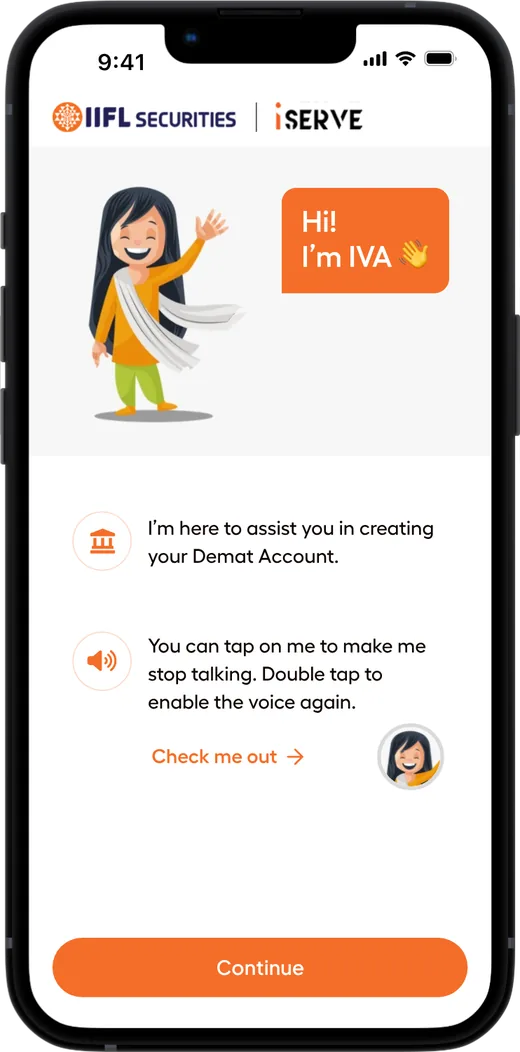
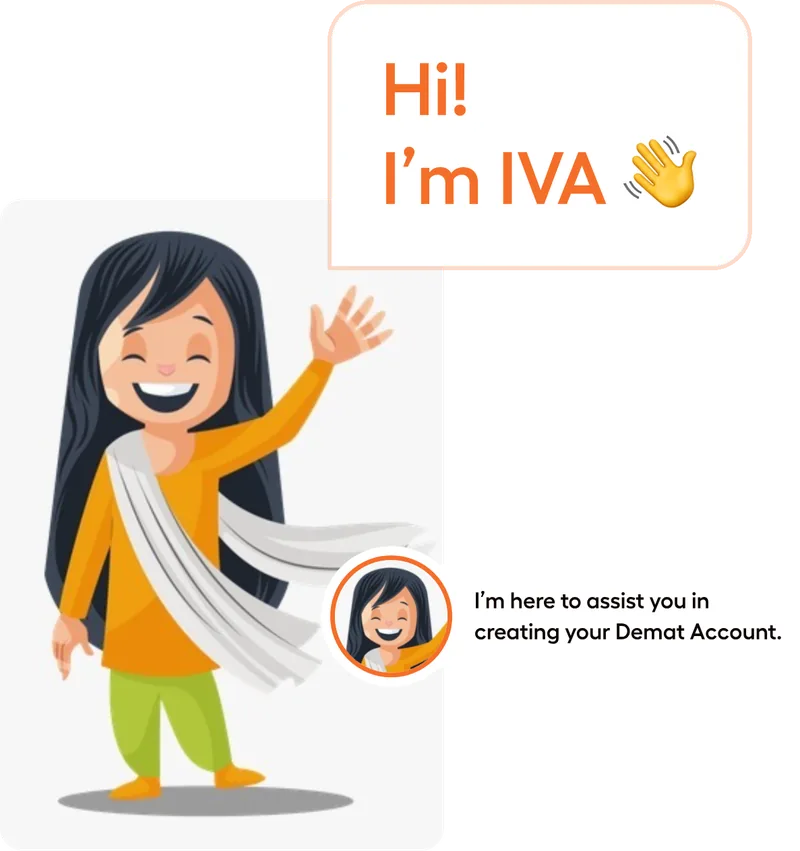
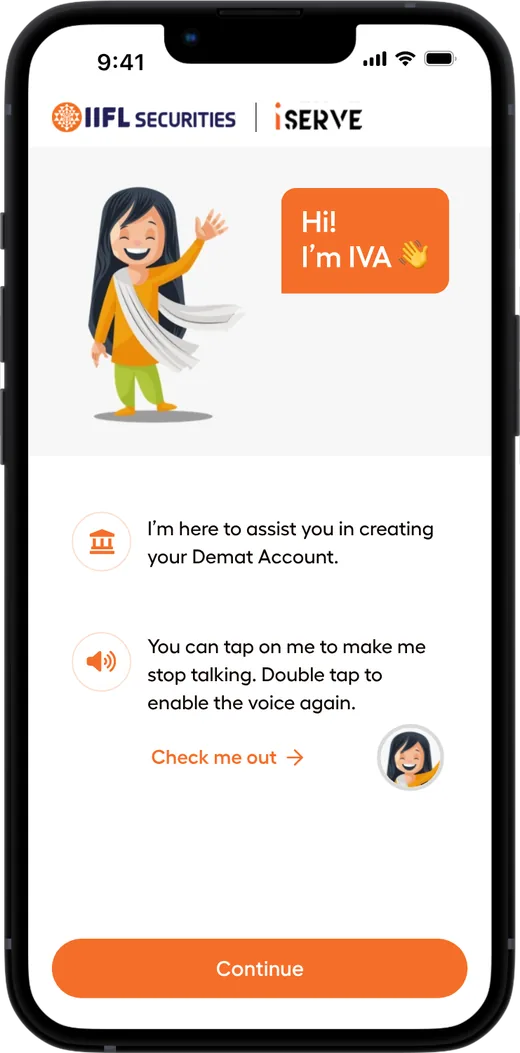
- 1We introduced IVA, an interactive voice assistant for IIFL Securities that guides users while they create their Demat and trading account.
- 2Clear instructions show how to use IVA: tap to stop it talking, double-tap to turn the voice back on.
Getting started
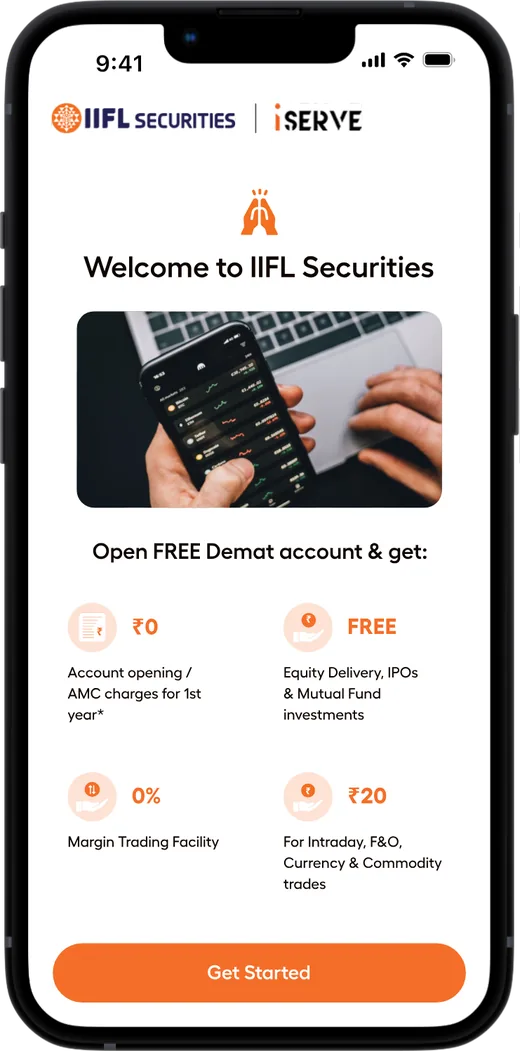
- 1The first screen shows the value of an IIFL account up front: ₹0 account opening, free equity delivery, 0% margin trading facility and ₹20 intraday trades.
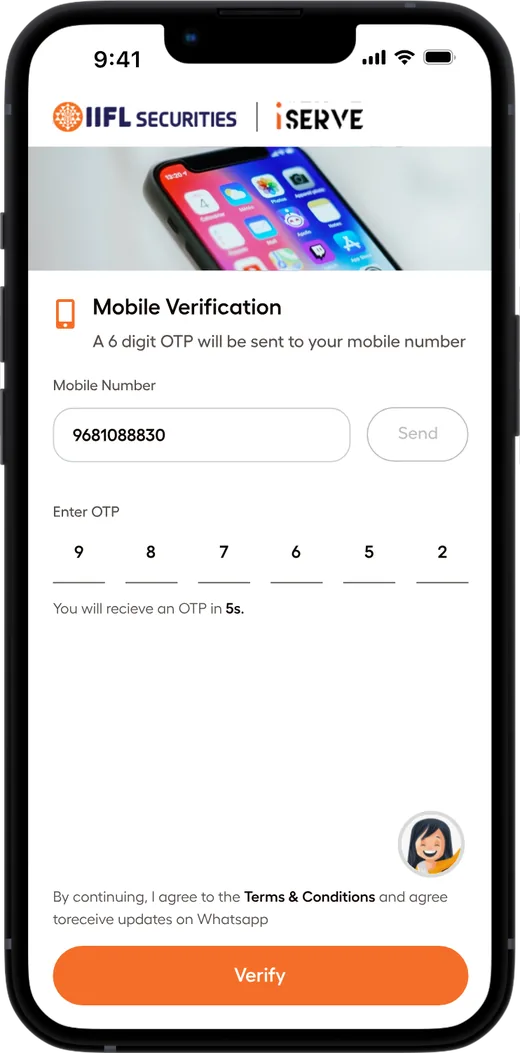
Verification
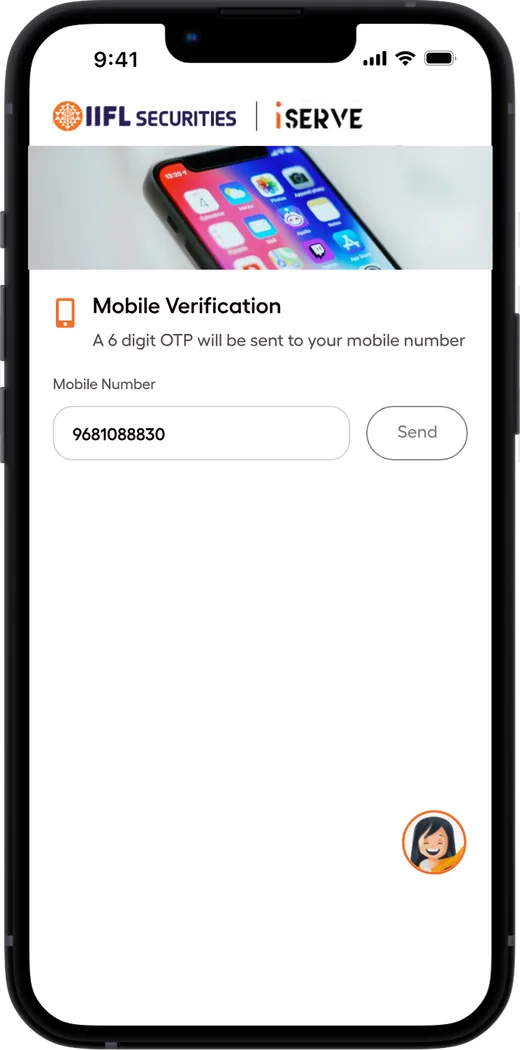
- 1A simple mobile number entry, so users get past the first step quickly.
- 2The OTP Send button turns back on when the number is edited, so a typo doesn’t mean starting over.
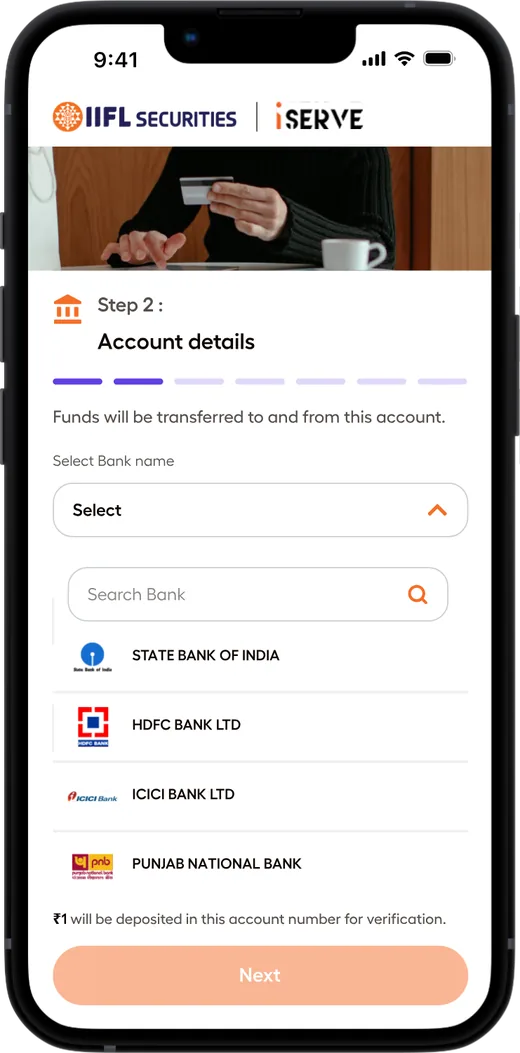
PAN and account details
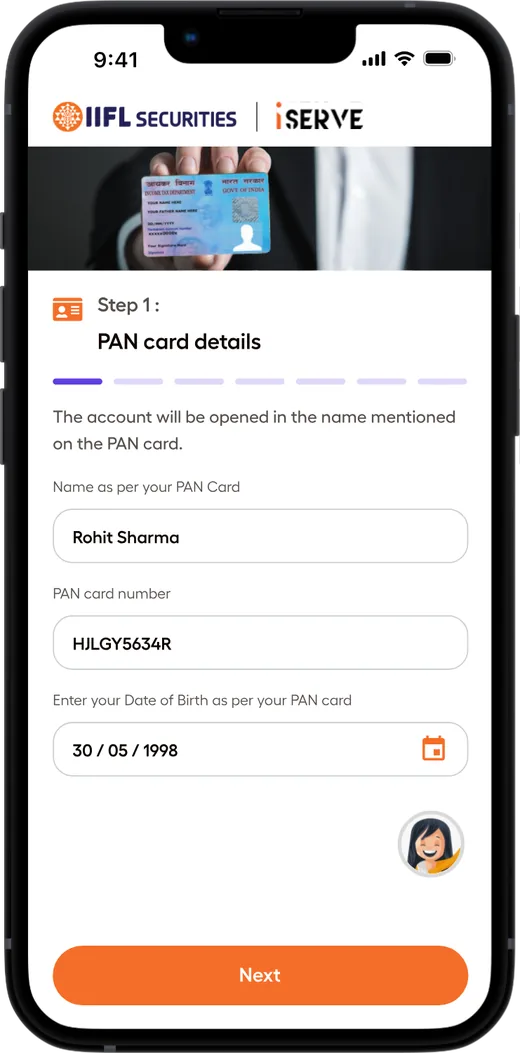
- 1Users enter their PAN details for identity checks and regulatory compliance.
- 2Users pick their bank and enter the account number. ₹1 is deposited to verify and link it.
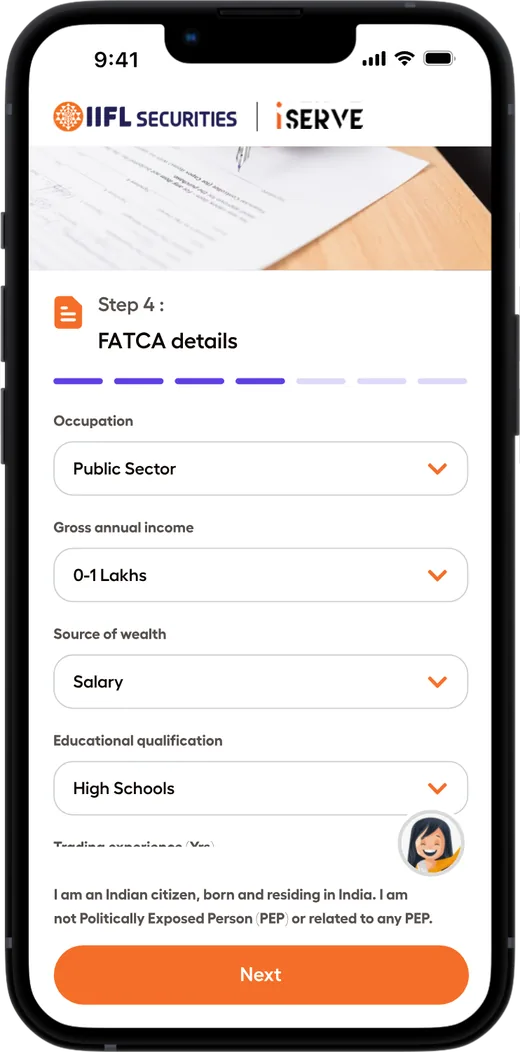
Investment preferences and FATCA
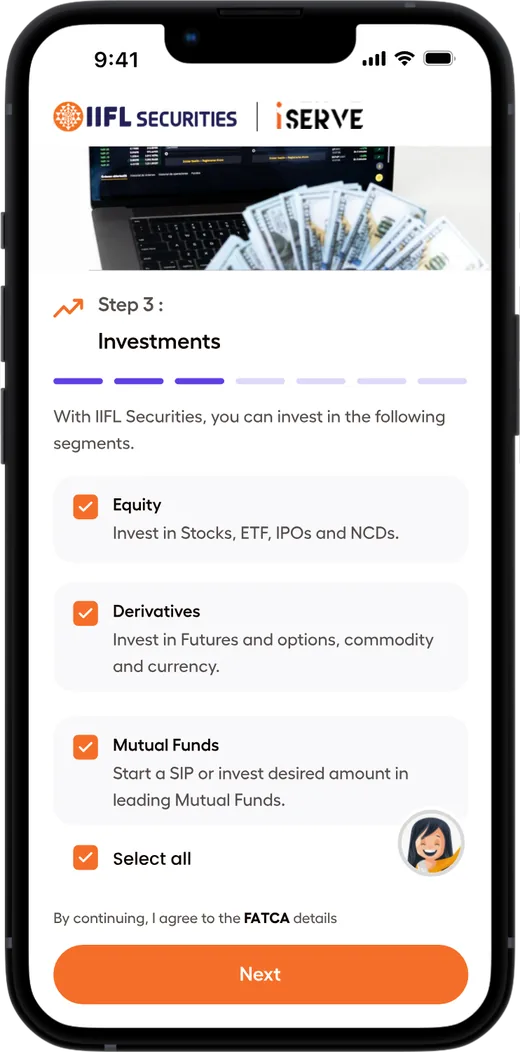
- 1Users choose the investment types that match their financial goals.
- 2FATCA (Foreign Account Tax Compliance Act) prevents tax evasion through foreign accounts, so it is a required step.
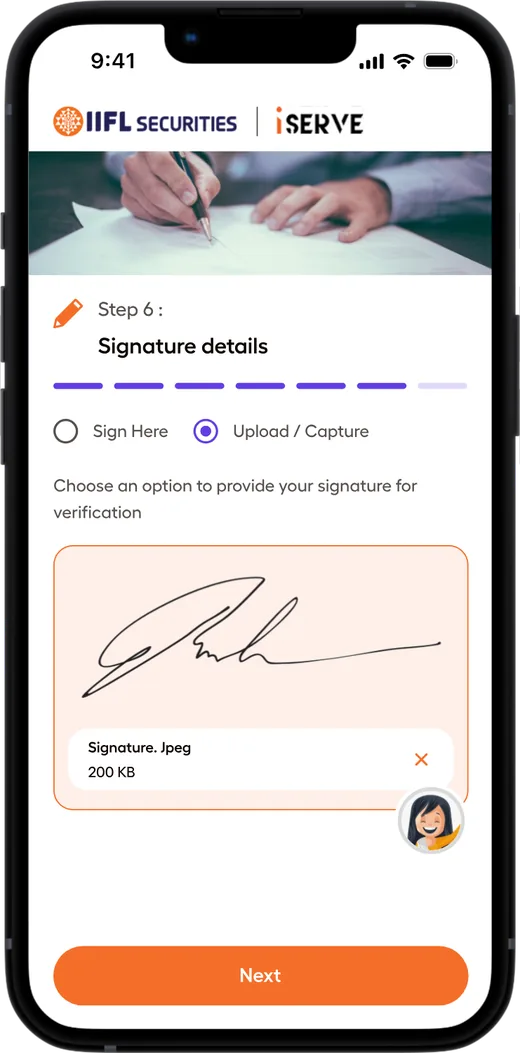
Personal details and signature
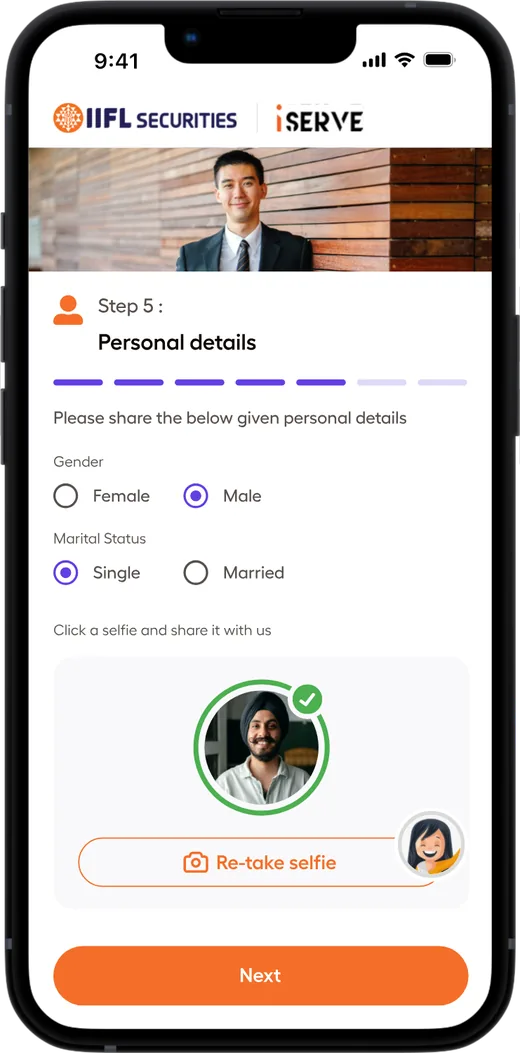
- 1Users take a selfie and submit it with their personal details for verification.
- 2Users can sign on screen or upload a photo of their signature.
Cheque details
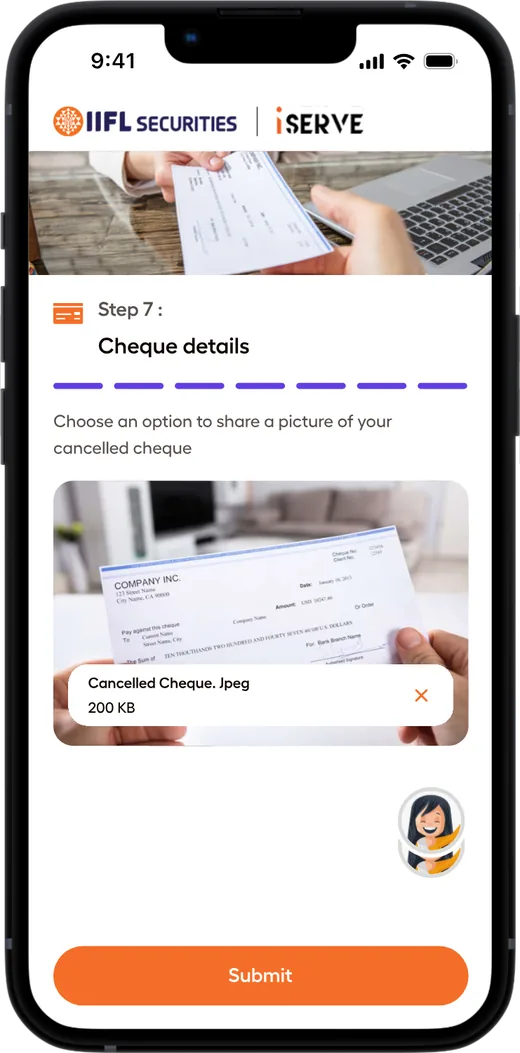
- 1A cancelled cheque confirms the bank details for secure transactions.
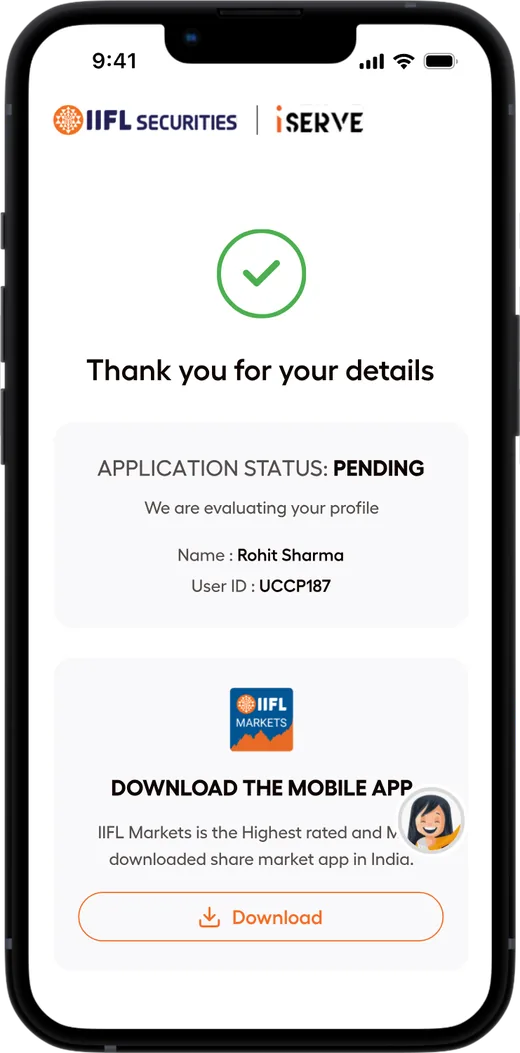
- 2The application is submitted for verification. IIFL may contact the user if anything needs clarifying.
08 · Impact
Business impact
01 · Reduced support
60%
Less customer service time
Users finished tasks faster through the IVR flow, so fewer needed an agent.
Client-reported · Ubona team02 · Improved experience
Easier to follow, start to finish
Voice plus visual help made a long, regulated flow feel guided and kept users engaged.
Design intent03 · Fewer errors and drop-offs
Guidance at every step
Step-by-step help was designed to cut mistakes and half-finished applications.
Design intent · not measured09 · Reflection
What I learned, and what I’d do today
Learnings
- 01
Design is a loop
Product design is collaborative: a cycle of feedback and iteration with Ubona and our design team shaped every screen.
- 02
Guidance lightens long flows
Visual IVR can make a long, regulated flow feel simple by giving continuous help and clear instructions.
- 03
Sell the vision
I learned to explain the bigger picture to project managers and keep the work focused on users.
If I designed this today
This was early-career work. With more experience, here is what I would change.
Make IVA visible
Put the voice in the screen
Replace the stock-photo banners with IVA’s speech bubble, and design her states: speaking, muted, listening, error, resume later.
Fewer steps
Challenge the requirements
DigiLocker or Aadhaar e-KYC could prefill PAN and address. The ₹1 deposit already checks the bank, so is the cheque still needed?
Prove it
Test and measure each step
Test with first-time investors, add a visible mute button instead of tap gestures, and track drop-off per step.
Thank you.
Back to top ↑Keep exploring